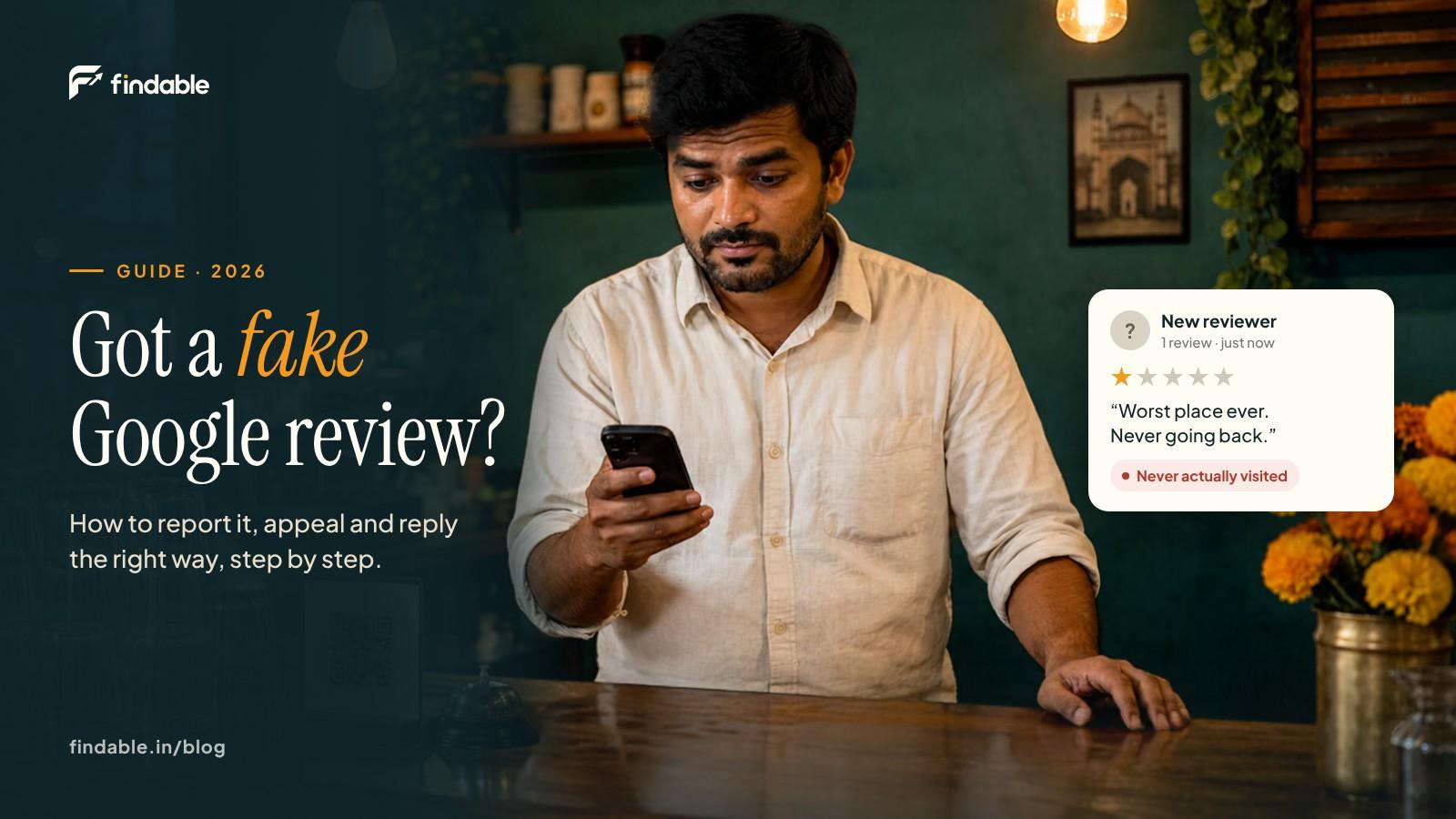
You check your phone at night and there's a new 1-star review on your shop. You don't recognise the name, and what it describes never happened.
The first instinct is to reply straight away, or to find someone who can make the review disappear. Wait. How to remove fake Google reviews isn't a trick or a contact. It's Google's own process, and this guide walks through it step by step: which reviews can be removed, how to report and appeal, what to write in your reply, and how to bring your rating back.
Not sure if Google will remove your review? Check it free in 2 minutes →
Short answer
- You can't delete a review yourself. Only the person who wrote it can remove it, or Google, if it breaks Google's rules.
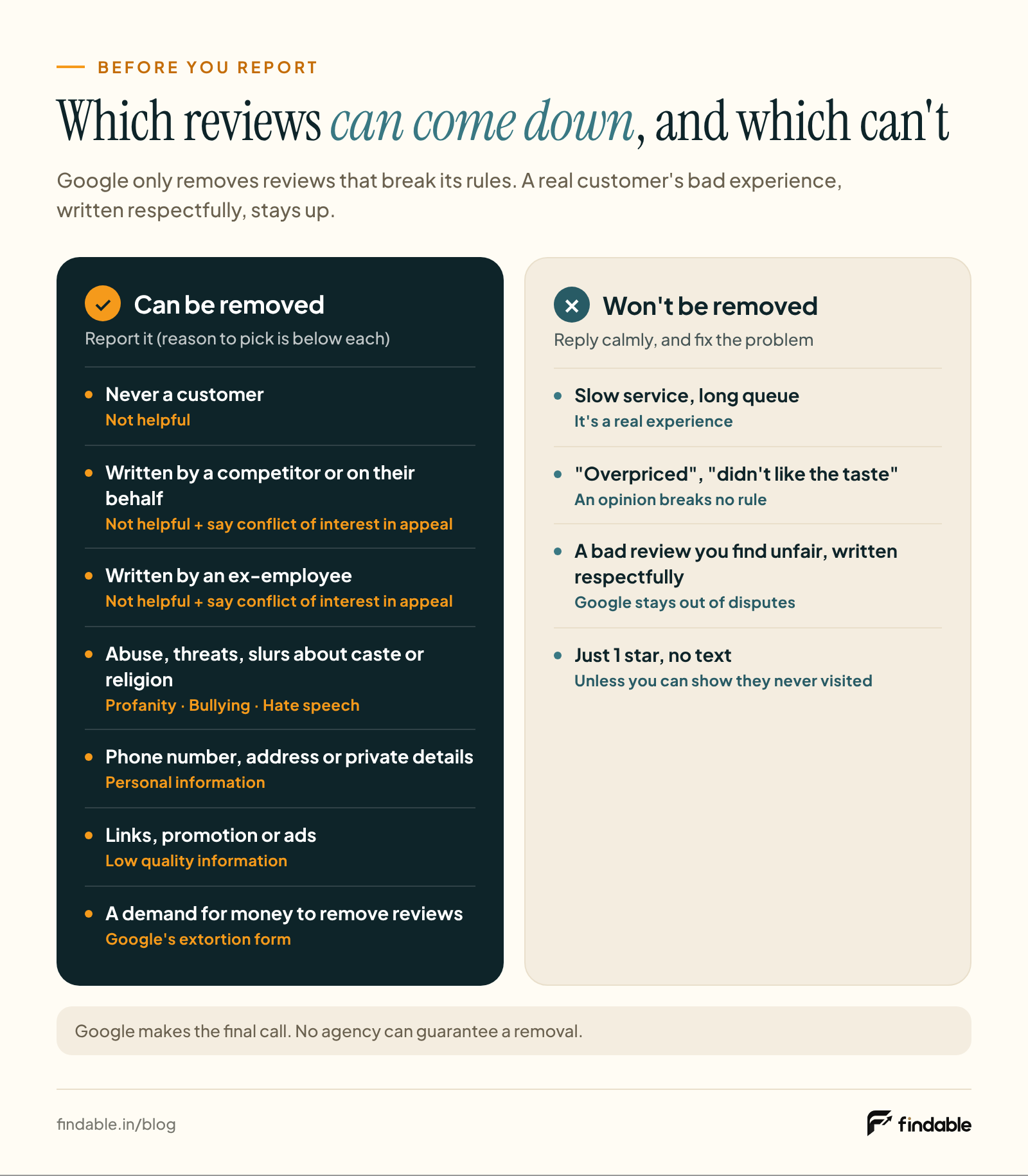
- First work out whether it's fake or just negative. Never a customer, a competitor, an ex-employee, abuse, or someone demanding money: these can be removed. A real customer's bad experience stays.
- If it's fake, report it. If the report is rejected, appeal once through the Reviews Management Tool.
- Either way, post one calm reply. Your next customer reads your reply as well as the review.
- Keep asking every customer for reviews. When genuine reviews keep coming in, one bad review counts for less. Findable makes that part easier.
The first 30 minutes: what to do and what not to do
What you do in the first half hour shapes everything after it.
Do this
- Take a screenshot. The review, the reviewer's name and the date. If the review changes later, or you need to appeal, you'll have proof.
- Check your records. That day's bills, bookings, appointment register or delivery list. Did anyone by this name visit? Ask your staff what happened that day.
- Compare the review with Google's rules. The table below is built for exactly this.
Don't do this
- Reply in anger. Replies are public, and the reviewer gets notified. Check your records first and write with a cool head.
- Call the reviewer to threaten them, or contact their family.
- Get ten friends and relatives to post 5-star reviews in response. This is against Google's rules and can get your profile restricted. More in What not to do.
Can a business owner delete a Google review?
No. There's no button in your Business Profile to delete someone else's review.
A review comes down in only three ways:
- The reviewer edits or deletes it.
- Google removes it because it breaks Google's content policy. You trigger this by reporting it.
- A legal route, through a legal request or a court. This is rare, and covered below.
So be careful with anyone who says "Pay ₹X and we'll get the review deleted, guaranteed". Google's report and appeal process is free, and you can do it yourself. Only Google decides whether a review stays or goes. Never give anyone your Google account login.
Wrote a review for another business yourself and want to delete it?
On your phone: open the Google Maps app → your profile picture at the top right → Your profile → tap the review → Delete review.
On a computer: Google Maps → Menu at the top left → Your contributions → Reviews → Menu next to the review → Delete review.
Fake, unfair or just negative? Work it out first
Google's rule fits in one line: a review must reflect a genuine experience. A negative experience described respectfully is allowed (Google Maps content policy).
Google also says plainly not to report a review just because you disagree with it, because Google doesn't get involved in disputes between businesses and customers (Google Business Profile Help).
Find your case in this table before you report:
| What the review is | Can Google remove it? | What to do |
|---|---|---|
| The person was never a customer, or the review is about a different business | Possibly. It isn't based on a real experience | Report as Not helpful (or Low quality information if it's about another place). Keep that day's records handy |
| Written by a competitor, or by someone on their behalf | Possibly. Posting on a competitor's listing to damage it is banned, and it's a conflict of interest | Report as Not helpful. Say "conflict of interest" if you appeal. Don't name or accuse anyone in your public reply |
| Written by an ex-employee after leaving | Possibly. Current or former employment counts as a conflict of interest | Report as Not helpful. If you appeal, say "conflict of interest" and give their dates |
| A sudden burst of 1-star reviews from unknown accounts in a day or two | Possibly. Unusual volumes or patterns are treated as signs of rating manipulation | Report each one separately. If someone then asks for money, see the extortion section |
| Abuse, threats, slurs about caste or religion, or sexual content | Yes. Profanity, harassment and hate speech are banned | Report as Profanity, Bullying or harassment or Discrimination or hate speech. Keep any reply very short, or don't reply |
| A staff member's phone number, home address or other private details | Yes. Personal information posted without consent is banned | Report as Personal information |
| Criminal accusations with no basis, like "these people are thieves" or "it's a fraud" | Possibly. Unsubstantiated allegations of criminal wrongdoing count as offensive content | Report as Bullying or harassment, and calmly state your side in a reply |
| Links to another website, phone numbers or promotion inside the review | Yes. Links, phone numbers and promotion are banned in reviews | Report as Low quality information (ads) |
| A real customer, a bad experience, even if you think it's unfair ("too slow", "overpriced", "didn't like the taste") | No. A negative experience described respectfully is allowed | Reply, and fix what you can |
| Just 1 star, no text | Usually not, unless you have reason to believe they were never a customer | Check your records. Report if you have a reason, otherwise post a short reply |
"Possibly" because Google makes the final call. Nobody can promise you that a particular review will come down.
How to report a fake Google review, step by step
You can report from two places. The first is the fastest. The second also shows you the status of your report.
Method 1: From your Business Profile
- Sign in with the Google account that manages your Business Profile, and open your profile.
- Go to Read reviews.
- Next to the review, select Report (the flag).
- Choose the reason. Google offers: Low quality information, Profanity, Harmful, Bullying or harassment, Discrimination or hate speech, Personal information and Not helpful. Pick the one listed for your case in the table above. There's also a "Report a legal issue" link at the bottom, which is for the legal route.
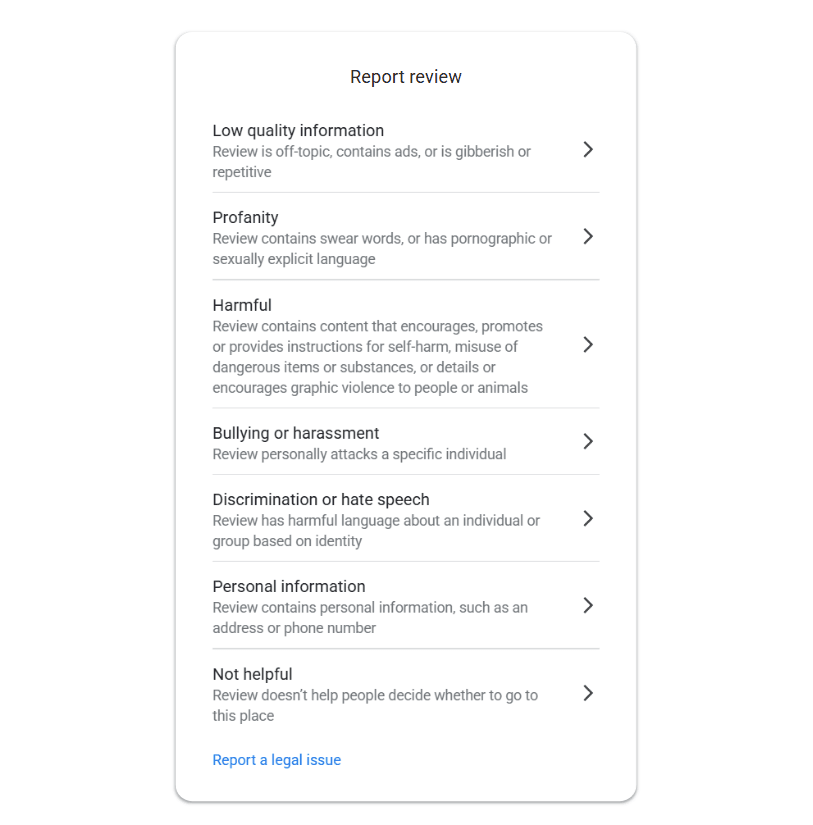
There's no separate "fake" or "conflict of interest" option. For those reviews, choose "Not helpful", and explain fully in the appeal if you need one.
- Select Send report.
Method 2: The Reviews Management Tool (shows the status too)
- Open Google's Reviews Management Tool.
- If the email shown is the one linked to your Business Profile, select Confirm. Otherwise choose Switch account.
- Select your business.
- Continue → Report a new review for removal → Continue.
- Select Report next to the review, choose the reason and Submit.
The same tool shows the status of each report:
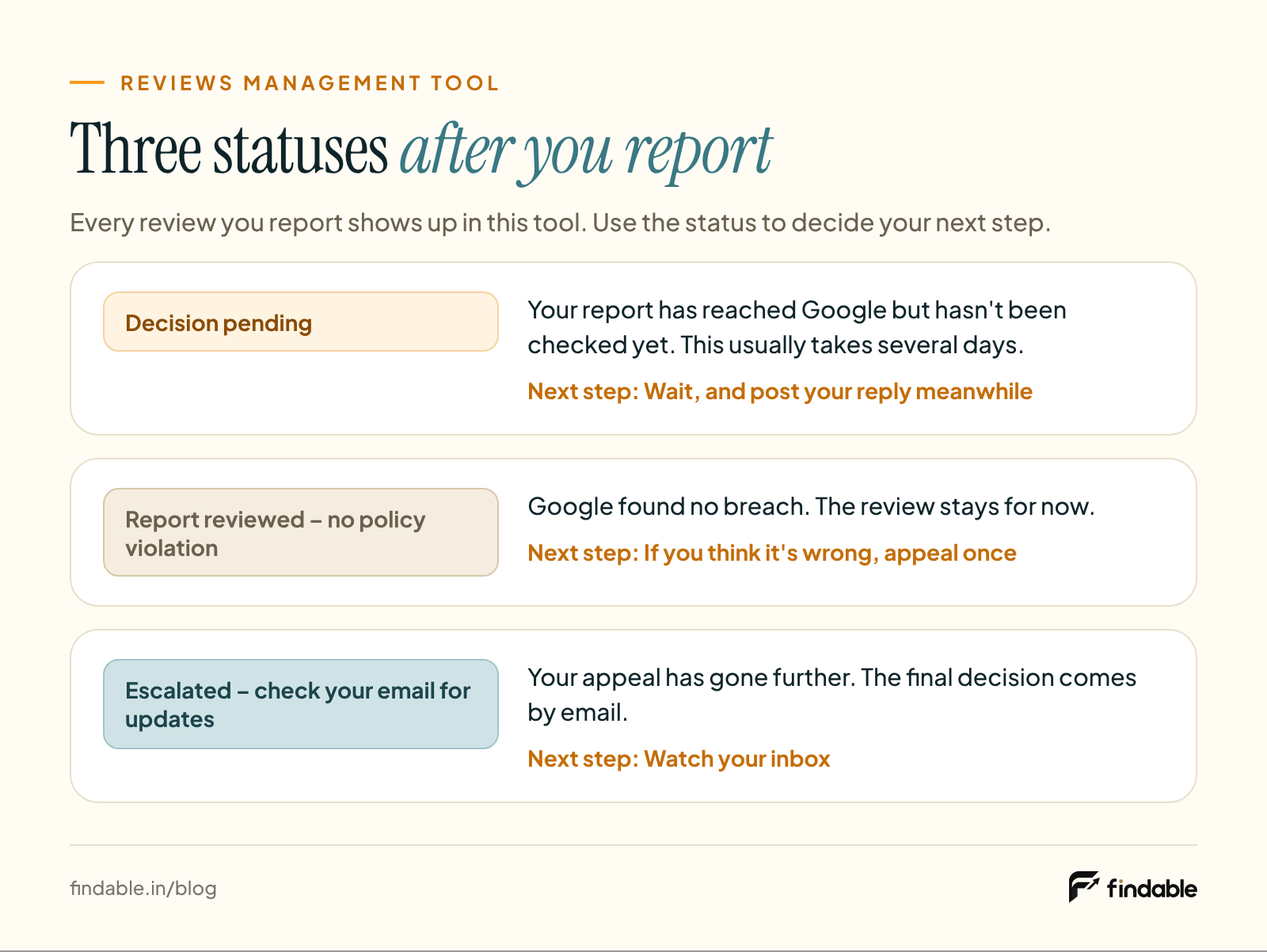
- Decision pending: the report has been received but not checked yet.
- Report reviewed – no policy violation: Google found no breach. You can appeal once.
- Escalated – check your email for updates: your appeal has gone further, and the decision will come by email.
Google says a report usually takes several days to be checked (source).
Why it works
One clear report with the right reason ties the review to the exact rule it breaks.
Common mistake
Reporting every negative review under whatever reason comes first. Google won't remove a real customer's bad review, and your time is better spent on the reviews that really are fake.
One account posting several fake reviews? Report the profile too
- Open the Google Maps app on your phone.
- Tap Business at the bottom right, then Reviews.
- Tap the reviewer's name.
- At the top right, tap More (three dots) → Report.
- Choose a reason and send it.
Several fake 1-star reviews at once?
Sometimes a handful of strangers leave 1-stars within a day or two. Don't panic. Take it one step at a time:
- Screenshot all of them, with dates and reviewer names.
- Report each review separately, with the right reason. If it's one account, report the profile too.
- Is someone asking for money or something else? That's extortion. Follow the steps below.
- Reply to each one briefly and calmly. Don't paste the same reply on all of them.
- Keep your normal routine. Keep asking every customer for a review, as you did before. Don't send the link only to the happy ones.
Report rejected? Appeal once
If the status says "Report reviewed – no policy violation" and you think that's wrong, Google lets you appeal once per review.
- Open the Reviews Management Tool and Confirm your account.
- Select your business.
- Continue → Check the status of a review I reported previously and appeal options → Continue.
- At the bottom, select Appeal eligible reviews.
- Choose the reviews to appeal. You can select up to 10 at once.
- Continue → Submit an appeal, fill in the form and Submit.
The result comes by email. If Google finds a violation, the review is removed. If not, it stays.
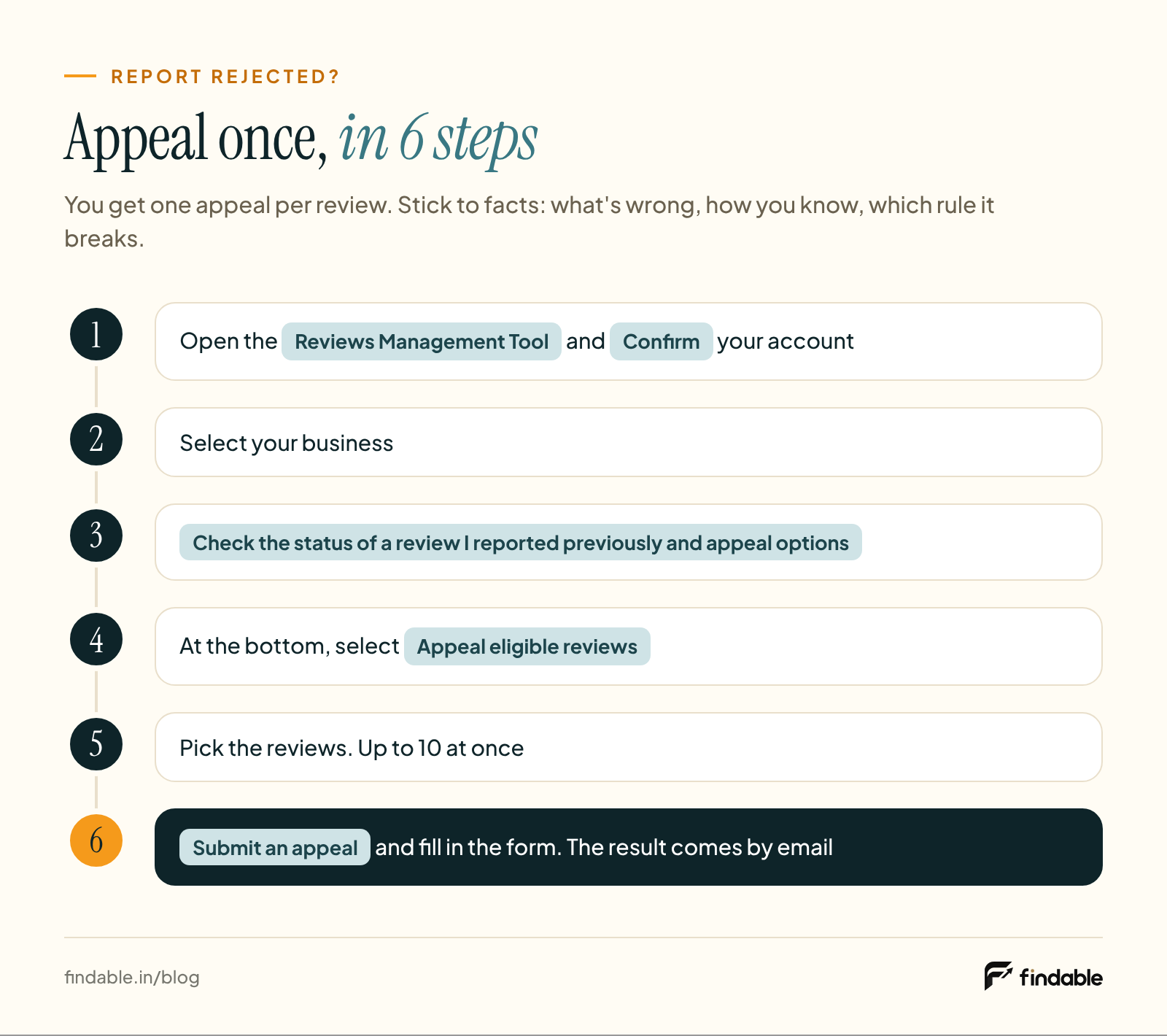
What to write in the appeal. You only get one appeal, so stick to facts: what's wrong, how you know, and which rule it breaks. Adapt one of these:
This review was not written by a customer of [Business name]. We checked our billing and booking records for [date range] and found no visit or order under this name. The review also mentions [detail], which we do not offer. We believe it is not based on a real experience and breaks Google's fake engagement policy.
The reviewer worked at [Business name] from [month, year] to [month, year]. This review was posted after they left. This is a conflict of interest under Google's rating manipulation policy.
Only include a customer's private details, such as a medical condition or bill amount, if it's truly necessary.
Someone is demanding money to remove reviews
Learn the pattern: a sudden wave of 1-star and 2-star reviews, then a message on WhatsApp, Telegram or email saying "Pay us and we'll remove them." Google calls this an extortion scam and has a separate form for it (Google's help page).
Google's advice, in short:
- Don't pay, and don't negotiate. Paying can lead to more demands, and it doesn't guarantee the reviews will be removed.
- Collect evidence straight away. A screenshot of every message showing the date, time and the sender's number or ID. A link to each review. When the reviews first appeared, and when the demand arrived.
- Fill in Google's merchant extortion report form and attach all the screenshots.
To get a review's link: Google Maps → your business → Reviews → More next to the review → Share review → Copy link.
In India, this is also a case of online threats and extortion. You can file a complaint on the National Cyber Crime Reporting Portal or at your local police station, using the same screenshots.
Google also says it may temporarily turn off new reviews on some profiles to protect the business (source).
When Google won't remove it: the legal route
This route is for a review that damages your business with a false claim, like "they sold expired medicine" when that never happened, and that stays up after a report and an appeal.
- Google's legal removal form. Start a request from Google's Report Content for Legal Reasons page, choose Google Maps and paste the exact link to the review. Say clearly which statement is false and why.
- The law. In India, defamation is covered by Section 356 of the Bharatiya Nyaya Sanhita, 2023, and it can also be a civil case. This route is slow and expensive, so speak to a lawyer first.
A real customer's bad experience, however harsh, is usually their own opinion. Don't use this route for it. A good reply is the answer there.
This is not legal advice. Speak to a lawyer about your case.
How to reply to a fake or negative review (with examples)
Your reply isn't only for the reviewer. Every new customer who opens your profile reads it alongside the review. They're your real audience.
Google's review reply tips say:
- Be professional and polite, and keep it short.
- Never share the reviewer's private information or attack them personally. If it's complicated, ask them to contact you by phone or email.
- Admit mistakes if you made them, but don't take responsibility for things outside your control.
- Apologise where it fits. Use the reviewer's name and sign off with yours.
- Reply promptly.
- Don't put offers or discounts in your reply.
Google checks replies against its rules too. This usually takes about 10 minutes, and sometimes up to 30 days. The reviewer is notified when you reply, and can change their review afterwards if they want (source).
A simple formula: name and apology or thanks → one fact → what changed or what you'll do → a way to talk offline → your name.
Reply in the language the review was written in.
Case 1: A real customer with a bad experience
Rahul, we're sorry you had to wait 40 minutes on Saturday evening. Several large orders came in together, but that shouldn't have been your problem. We now have an extra cook on weekends. Please call me on [phone number] and I'll look into it personally. – Sunil, [Business name]
राहुल जी, शनिवार शाम आपको 40 मिनट इंतज़ार करना पड़ा, इसके लिए माफ़ी। उस दिन एक साथ कई बड़े ऑर्डर आ गए थे, पर यह आपकी परेशानी नहीं थी। अब वीकेंड पर किचन में एक और कुक रहता है। आप [फ़ोन नंबर] पर कॉल कर लीजिए, मैं खुद बात करूँगा। – सुनील, [दुकान का नाम]Case 2: You don't think they were ever a customer
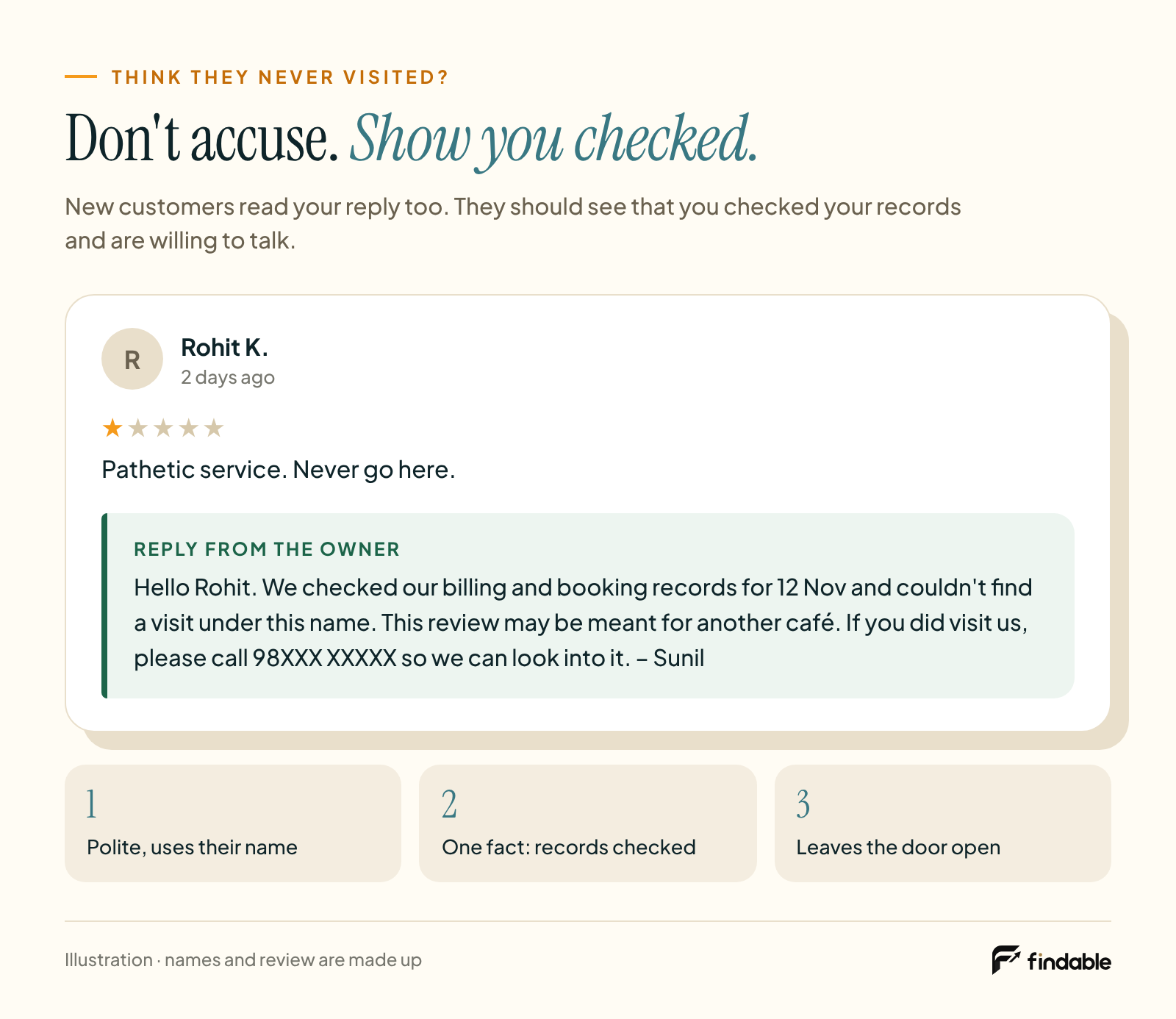
The biggest mistake here is calling the reviewer a liar. Don't accuse anyone. Show that you checked, and leave the door open.
Hello [Name]. We checked our billing and booking records for [date] and couldn't find a visit under this name. This review may be meant for another [salon/café/clinic]. If you did visit us, please call [phone number] so we can look into it. – [Your name]
A new customer reading this sees two things: you checked, and you're willing to talk.
Case 3: Abuse, threats or hate
Report it first. Then either don't reply, or post one neutral line. Don't get into an argument.
We'd like to understand what happened. Please call us on [phone number]. – [Your name]
Case 4: You suspect a competitor or an ex-employee
Don't name anyone or make accusations in public. If you're wrong, it hurts you. Report it as Not helpful, say "conflict of interest" if you need to appeal, and keep your reply neutral, like Case 2.
Run a clinic, hospital or pharmacy? Never mention a patient's condition, treatment or visit details in a reply, even if they wrote about it themselves. Not even "According to our records, your treatment…".
Common mistake
Pasting the same "Sorry for the inconvenience" under every review. Writing a long defence. Or saying "Remove the review and we'll refund you". Offering anything in exchange for removing a review is against Google's rules.
How to win your rating back after a bad review
Your Google rating is the average of all your published ratings. After a new review, it can take up to 2 weeks for the score to update (source).
An example (the numbers are only illustrative):
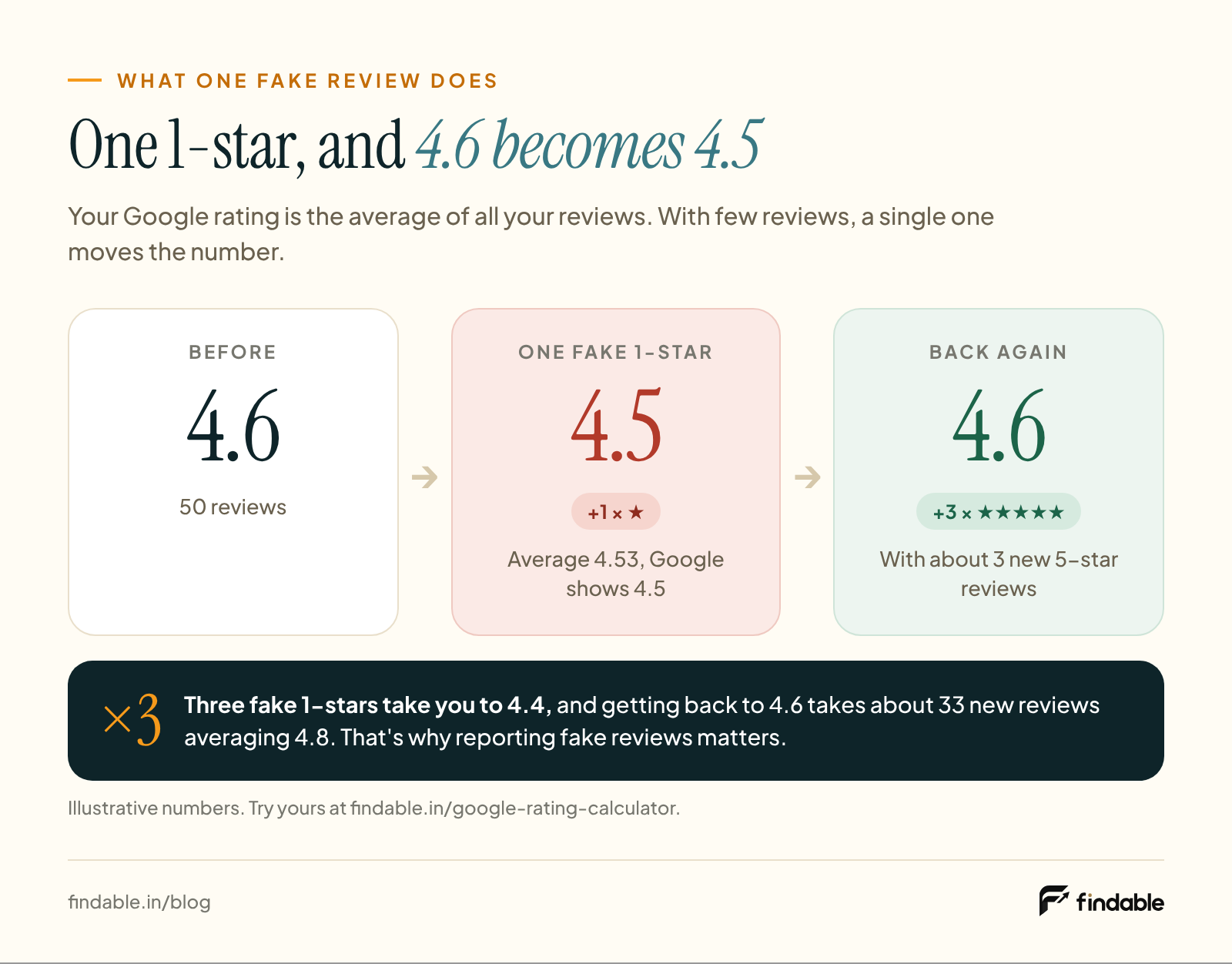
- Say you have 50 reviews with an average of 4.6.
- One fake 1-star arrives. The average drops to 4.53, and Google shows 4.5.
- To show 4.6 again you need about 3 new 5-star reviews. If your new reviews average 4.8, you need about 5.
- If 3 fake 1-stars arrive, the average drops to 4.4. Now you need about 33 new reviews averaging 4.8 to get back to 4.6.
Two lessons:
- If a fake review is removed, your rating recovers on its own. That's why reporting it properly matters.
- The more reviews you have, the less any single one counts. One 1-star barely moves a shop with 500 reviews.
The honest way to bring it back:
- Ask every customer, not only the happy ones. Sending your review link only to happy customers after a bad review is against Google's rules. How to ask everyone, with scripts: How to increase Google reviews: 9 free ways.
- Keep the review one tap away. Make a free review link and QR code, and put a standee on the counter.
- Fix the complaints that are true. If the same complaint keeps coming up, it's not a review problem, it's an operations problem.
- Talk to the customer and sort it out. Customers sometimes update their review on their own. But never offer a refund, discount or gift in exchange for changing it.
- Ask a little every day. A sudden flood of reviews can look like an unusual pattern to Google.
Hard to remember to ask every customer in the rush? Staff forget, and customers who do scan the QR often stop at the empty review box. Findable makes this easier, from the counter QR to the review draft, so a few new genuine reviews come in every day. See how
What not to do
These are the mistakes people make in anger, and they put the whole profile at risk instead of one review. All of them are banned under Google Maps' content policy:
- Posting 5-star reviews yourself, or getting staff, family or friends to do it.
- Buying reviews, or joining "you review me, I review you" groups.
- Posting a revenge review on a competitor's listing.
- Offering a refund, discount or free service in exchange for removing or changing a review.
- Stopping customers from posting on Google, or sending your review link only to happy customers after a bad review.
- Threatening a reviewer, or making their private details public.
One more that isn't on Google's list but costs you anyway: paying a "guaranteed removal" agency or handing them your Google login.
What happens if you're caught?
According to Google's Business Profile restrictions page, as well as removing the fake reviews, Google can:
- 01Stop your profile from receiving new reviews for a set period
- 02Hide your existing reviews for a set period
- 03Show a warning on your profile saying fake reviews were removed
One angry review isn't worth that risk.
Next time: let complaints reach you first
Many 1-star reviews happen because the customer felt nobody at the shop would listen.
- A small sign at the counter: "Something not right? Talk to the manager, or WhatsApp us on [number]."
- The same number on the bill.
- Reply to complaints the same day.
The line you must not cross: this is a way to raise a complaint, not a replacement for a review. Everyone still gets your review link, whether they complained or not. Discouraging customers from posting on Google is against Google's rules.
The real protection: a steady flow of genuine reviews (how Findable helps)
To be clear first: Findable does not delete reviews. Stay away from any tool or agency that promises to.
Remember the maths above: one 1-star drags down a shop with 50 reviews, but barely moves one with 300. Findable is built for that second part: new genuine reviews coming in every day, so one bad review isn't your shop's whole story.
- One QR on the counter. The customer scans it, with no app to download.
- An easy start instead of an empty box. The customer taps what they liked and gets a short draft they can change however they want.
- The customer posts it, from their own Google account. The review is theirs, not yours.
- For every customer, not just the happy ones. That's the way Google's rules want it.
We don't promise ratings or rankings.
FAQ
How long does it take Google to remove a fake review?
Google says checking a report usually takes several days. Appeal results come by email. There's no fixed timeline, and Google decides whether the review is removed.
Can I find out who wrote a fake Google review?
No. Google doesn't share a reviewer's private details with the business. Even in extortion investigations, Google says it can't share specific details for privacy reasons. If a case goes to the police or a court, that's the route.
Are fake reviews illegal in India?
Fake reviews are against Google's rules, and Google removes them. In 2022 the Government of India launched a standard for online reviews, IS 19000:2022. If a review comes with a demand for money, or damages your reputation with false claims, extortion and defamation laws may apply. Ask a lawyer about your case.
Should I use a review removal service?
Google's report and appeal process is free, and you can do it yourself. Only Google can decide to remove a review, so no agency can guarantee it. Never hand over your Google login.
Can I give a refund to get a bad review removed?
Refunding a customer when you made a mistake is fine. Making the refund conditional on removing or changing the review is against Google's rules. Solve the problem first. Whether the review changes is up to the customer.
My good reviews suddenly disappeared. What should I do?
Google uses automated spam detection, which sometimes removes genuine reviews by mistake. If that happens, contact Google Business Profile support. Reviews removed for breaking the rules won't be restored (source).
What about fake reviews on Zomato, Swiggy or Justdial?
This guide covers Google only. Each platform has its own rules and its own report option, so use the report button next to the review there too. If anyone asks for money to remove a review, on any platform, you can complain at cybercrime.gov.in.
Does one bad review hurt my Google ranking?
Google says the number of reviews and your rating can help local ranking (source). Nobody can say exactly how much one review changes it. That's why both replies and a steady flow of new genuine reviews matter.
Your 5-minute checklist
- Screenshot the review
- Check that day's records
- Use the table: fake or just negative?
- If fake, report it with the right reason
- Post one calm reply
- Keep asking every customer for a review
The answer to a fake review isn't anger, it's a process: identify it, report it, reply calmly, and let genuine reviews keep coming.
Step one · free
Work out your rating, and how many new reviews it takes to recover.
Step two · free
Put your review link one tap away for every customer. No sign-up.
Findable's free tools
- Google review link and QR code generatorfind your shop, get the link and QR instantly.Open →
- Google review standee designs15 free designs, ready to print.Browse →
- Google rating calculatorhow many new reviews move your rating.Calculate →
Send this guide to a shop-owner friend
Sources
- Google, Maps user-generated content policy: Prohibited & restricted content (Fake engagement, Rating manipulation, Offensive content, Personal information, Advertising & solicitation). support.google.com/contributionpolicy/answer/7400114
- Google Business Profile Help: Report inappropriate reviews on your Business Profile (report, Reviews Management Tool, one-time appeal, user profiles, automated spam detection). support.google.com/business/answer/4596773
- Google Business Profile Help: Report negative review extortion scams. support.google.com/business/answer/16404809
- Google Maps Help: Report or fix content (how reviewers delete their own reviews). support.google.com/contributionpolicy/answer/7445749
- Google Business Profile Help: Manage customer reviews (replies, notification, review links). support.google.com/business/answer/3474050
- Google Business Profile Help: Tips to get more reviews (review reply tips). support.google.com/business/answer/3474122
- Google Business Profile Help: Business Profile restrictions for policy violations. support.google.com/business/answer/14114287
- Google Business Profile Help: About missing or delayed reviews. support.google.com/business/answer/10313341
- Google Business Profile Help: Understand review scores. support.google.com/business/answer/4801187
- Google Business Profile Help: Tips to improve your local ranking. support.google.com/business/answer/7091
- Google Legal Help: Report content for legal reasons. support.google.com/legal/answer/3110420
- Press Information Bureau, Government of India (21 Nov 2022): IS 19000:2022 framework on online consumer reviews. pib.gov.in
- National Cyber Crime Reporting Portal, Government of India. cybercrime.gov.in
All pages opened on 17 Nov 2026. Published , last updated .